
Comprehensive review of the IK Multimedia iRig Pro Quattro I/O audio interface for DJs and producers. Discover if this versatile 4-input interface is the perfect add-on device for DJs.
iRig Pro Quattro I/O Audio Interface Review: The Ultimate DJ Add-On Device?
As DJs expand their capabilities—incorporating live streaming, adding instruments, integrating microphones, or using DVS systems—they inevitably accumulate a collection of small audio interfaces and adapters. Each serves a specific purpose, but collectively they create a bag full of devices that all do similar things. The IK Multimedia iRig Pro Quattro I/O attempts to be the Swiss Army knife that replaces them all. But does it succeed for DJ applications?
Understanding the DJ Add-On Device Landscape
Before examining the Quattro I/O specifically, it’s worth understanding what DJs need from add-on audio devices. These needs vary significantly based on how you DJ and what you’re trying to accomplish:
DVS Systems: If you want to control DJ software with timecode vinyl, you need a four-in, four-out audio interface. Two inputs receive the timecode signal from your turntables, while two outputs send the audio back to your DJ mixer. Most high-end DJ mixers now have this functionality built-in, but standalone DVS interfaces remain essential for DJs using standard mixers.
Software-Only DJing: When DJing with just a laptop and software—no controller—you need a simple audio interface that provides separate master and headphone outputs. This allows proper cueing and monitoring without physical DJ hardware.
Live Streaming: Getting audio from your DJ setup into streaming software requires an audio interface that can capture stereo (or even multi-channel) audio and route it to your computer.
Instrument Integration: Adding synthesizers, drum machines, or samplers to DJ sets requires line inputs and often MIDI connectivity to keep everything synchronized.
Microphone Inputs: Whether for announcing, hosting, or incorporating vocals, microphone inputs with proper preamps are essential for many DJ scenarios.
Professional Output: Feeding clean, strong signals to PA systems often requires balanced outputs with proper level controls.
The challenge is that accomplishing all these tasks traditionally requires multiple devices. The Quattro I/O attempts to handle everything in one unit.
Build and Design
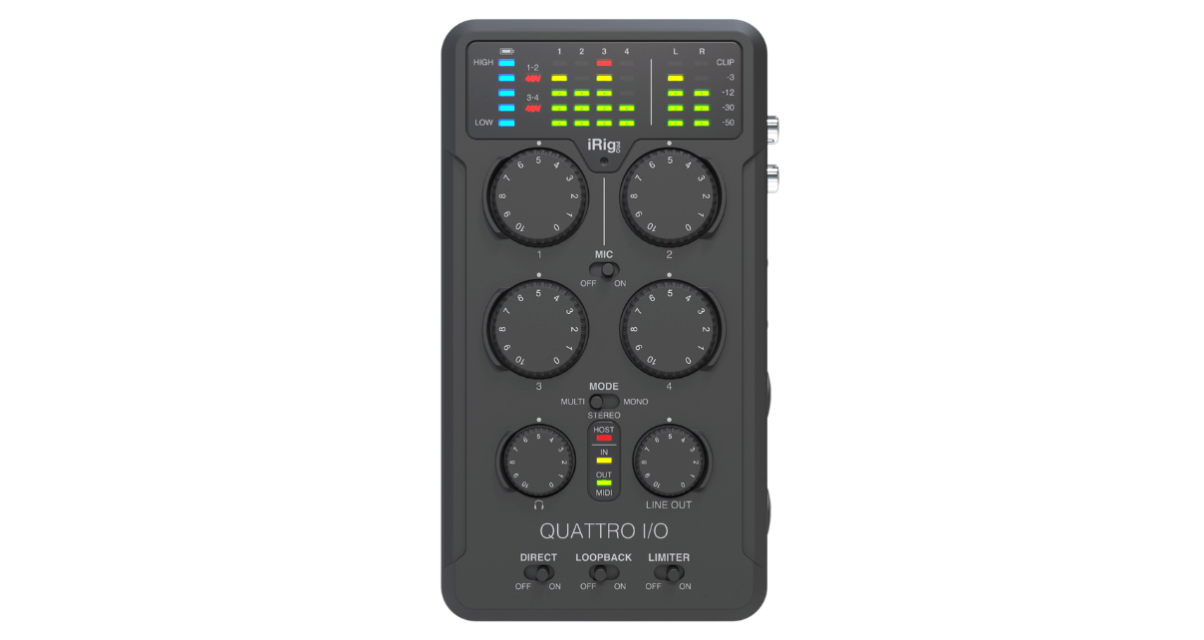
The iRig Pro Quattro I/O is a solidly built metal unit that feels professional and durable. It’s compact enough for mobile use but substantial enough to inspire confidence. The unit can be powered by internal batteries, external power supply, or USB bus power, providing excellent flexibility.
Metering is comprehensive, with per-channel LED indicators showing input levels and an overall output meter. Battery status is also clearly displayed. The physical controls are well-laid-out and accessible, with dedicated buttons for loopback, direct monitoring, and other essential functions.
Input Configuration
The Quattro I/O provides four inputs, but with an important limitation for DJ use: only two can accept line-level signals directly via RCA or eighth-inch connections. The other two inputs are combination XLR/quarter-inch connectors designed primarily for microphones or instruments.
While you can technically plug line-level signals into these mic/instrument inputs and adjust gain appropriately, this feels like a workaround rather than an intended use case. For DJ applications requiring four line inputs—such as DVS use—this limitation is significant.
The two dedicated microphone preamps are high-quality and provide phantom power, making them suitable for professional condenser microphones. For DJs doing live streaming with microphone commentary or incorporating live vocals, these inputs are excellent.
Output Limitations
The Quattro I/O’s most significant limitation for DJ use is its output configuration: it only provides two outputs (one stereo pair). For using DJ software without a controller, you need four outputs—two for the master audio going to speakers, and two for the headphone cue signal. The Quattro I/O can’t provide this.
This single limitation eliminates many potential DJ use cases. You can’t use it as your only interface for controller-free DJing. You can’t use it for DVS, which requires two inputs and two outputs (plus your master audio routing).
Where It Excels for DJs
Despite these limitations, the Quattro I/O excels in several DJ-relevant scenarios:
Live Streaming: The ability to send one, two, or all four inputs to your computer makes this excellent for streaming. You can configure complex mixes with your DJ output, microphone, and additional sources all routed independently to your streaming software.
Mixer Replacement: With four inputs and balanced outputs, the Quattro I/O can function as a small PA mixer. You can blend your DJ output with microphones or other sources and send a clean, strong signal to PA speakers.
Production Integration: The MIDI connectivity means you can integrate MIDI controllers, synthesizers, and other production equipment. Combined with the audio inputs and high-quality preamps, this makes the Quattro I/O a genuine production interface that also handles DJ duties.
Mobile Recording: The battery power and multiple high-quality inputs make this excellent for field recording or capturing samples and DJ drops on the go.
iPad/Mobile Device Use: The USB-C connectivity works with iPads and modern mobile devices, opening up interesting possibilities for mobile DJing and production setups.
Audio Quality and Performance
IK Multimedia’s reputation for high-quality audio interfaces is well-deserved, and the Quattro I/O delivers professional performance. The microphone preamps are clean and quiet with plenty of gain for even low-output dynamic microphones. The converters provide 24-bit/96kHz resolution, which is more than adequate for any DJ or production application.
Direct monitoring with zero latency is available, crucial when you need to hear inputs without the delay introduced by computer processing. The loopback feature allows you to route computer audio back into the interface for streaming or recording purposes.
What’s Missing for DJs
To be the perfect all-in-one DJ interface, the Quattro I/O would need several modifications:
Four Outputs: Essential for controller-free DJ software use and DVS applications. Without four outputs, entire categories of DJ use are impossible.
Four Line Inputs: While the two mic/line combo inputs might technically accept line-level signals, having four proper line inputs would make DVS and multi-source mixing much cleaner.
Phono Preamp: Adding a switchable phono preamp would allow direct connection of turntables for vinyl ripping or DVS use without requiring separate preamp boxes.
Dedicated DJ Mode: A configuration specifically optimized for DJ use—perhaps with preset routing and monitoring setups—would make the interface more DJ-friendly out of the box.
With these additions, the Quattro I/O would genuinely replace most of the small devices DJs accumulate. As it stands, it’s excellent for production and live streaming but falls short of being the comprehensive DJ solution.
Practical DJ Workflows
Despite its limitations, the Quattro I/O fits into several useful DJ workflows:
Live Streaming Setup: Connect your DJ controller’s master output to inputs 1-2, connect a microphone to input 3, and configure the interface to send all inputs separately to your computer. Your streaming software can then create a mix with independent control over music and voice levels.
Small Event Production: Use inputs for your DJ output and one or two microphones, blend them using the gain controls, and send a balanced output to the PA system. The battery power means you’re not dependent on finding power outlets near your setup.
Production with DJ Integration: Set up the Quattro I/O as your primary production interface, using it for recording, MIDI connectivity, and monitoring. When you want to DJ, plug your controller’s output into the line inputs and monitor through the interface.
Value Proposition
The Quattro I/O represents a significant investment, particularly for a device that doesn’t fully solve the DJ interface problem. For DJ/producers who need a high-quality production interface that can also handle some DJ-related tasks, it makes sense. For DJs looking for one device to rule them all, the missing features are too significant.
Compared to buying multiple cheaper devices (a simple two-output interface for controller-free DJing, a separate DVS interface, a USB audio interface for streaming), the Quattro I/O is more expensive and still doesn’t cover all bases. However, it does deliver significantly better audio quality than budget alternatives.
The Ideal DJ Interface
If IK Multimedia or another manufacturer created a version of the Quattro I/O with four line inputs, four outputs, and an optional phono preamp, it would be transformative. Add the MIDI connectivity, microphone preamps, battery power, and flexibility that already exist, and you’d have the definitive all-in-one interface for mobile DJs and DJ/producers.
Such a device would replace:
- DVS interfaces
- Simple DJ audio interfaces
- Live streaming adapters
- Portable mixers
- MIDI interfaces
- Field recorders
- Vinyl ripping interfaces
Until that device exists, DJs will continue carrying multiple smaller boxes, each optimized for specific tasks.
Final Verdict
The iRig Pro Quattro I/O is a high-quality, versatile audio interface that excels at many tasks. For DJ/producers who need professional-grade recording, live streaming capabilities, and some DJ integration, it’s an excellent choice. The build quality is solid, the audio quality is professional, and the feature set is comprehensive.
However, it falls short of being the ultimate all-in-one DJ solution due to its output limitations and input configuration. DJs who primarily need controller-free software DJing or DVS support will need to look elsewhere. Those accumulating multiple small devices for different DJ tasks will still need several of them, as the Quattro I/O doesn’t quite replace everything.
It’s a capable, professional audio interface with good DJ-adjacent features rather than a true DJ-first interface. For the right user—particularly DJ/producers who need recording and production features alongside some DJ capabilities—it’s an excellent investment. For DJs seeking one device to simplify their entire mobile rig, the search continues.
Related posts:
 Roland Go:Mixer Pro-X Review: Essential Audio Interface for DJ Livestreaming
 Mackie M-Caster Live Review: The DJ’s Streamer-Friendly Audio Interface
 Arturia AudioFuse Audio Interface Review: Professional Studio Connectivity Redefined
 Howler Recorder and Streamer Review: The Compact Audio Interface Solution for DJs
 Keith McMillen K-Mix Review: The Ultimate Portable Digital Mixer for Modern Musicians
 Pioneer DJ DDJ-FLX4 Review: Ultimate Beginner Controller & Smart Mixing Solution
 Fosi Audio GR40 Tube DAC Preamp Review: Versatile Audio Performance Tested
 Denon Prime 4 Plus Review: Is It the Ultimate All-in-One DJ System?