

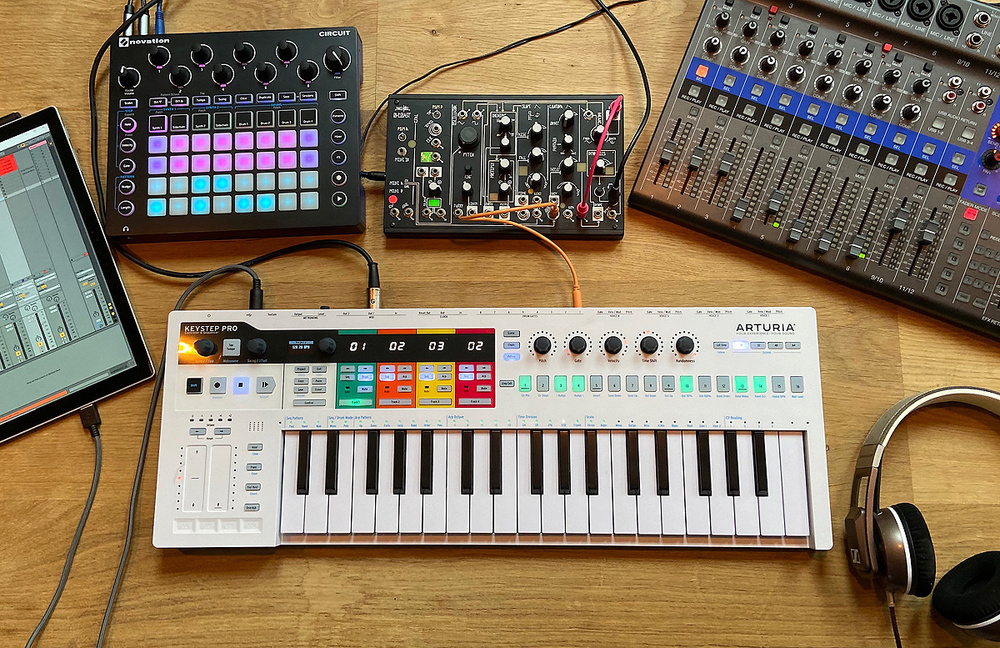
Complete guide to building a hybrid music production setup centered around the Arturia KeyStep Pro. Learn how to integrate hardware synths, drum machines, and software instruments for ultimate creative flexibility.
Arturia KeyStep Pro Review: Building the Ultimate Hybrid MIDI Controller Setup for Modern Production
Introduction: Beyond the DAW
The Arturia KeyStep Pro represents a different approach to MIDI control—one that bridges hardware and software, traditional and modern, structured and spontaneous. This comprehensive review explores building a hybrid music-making station centered around this innovative controller, demonstrating how it transforms production workflows.
What Is the KeyStep Pro?
Core Identity
The KeyStep Pro functions as a MIDI sequencer controller featuring four separate polyphonic tracks built directly into the hardware. This architecture enables unprecedented flexibility in controlling multiple sound sources simultaneously.
Three Workflow Approaches
Fully DAW-less Setup: Control eurorack modular systems, hardware synthesizers, and drum machines entirely without computer dependency.
Pure Software Control: Use all four tracks to trigger different software instruments within your digital audio workstation, creating elaborate multi-timbral arrangements.
Hybrid Approach: Blend hardware and software, taking advantage of each realm’s strengths while maintaining flexibility and creative inspiration.
Building the Hybrid Setup Philosophy
Reducing Mouse Dependency
The goal isn’t complete DAW elimination—it’s reducing tethering to mouse and keyboard that often disrupts creative flow. Having hardware instruments connected, configured, and ready to play enables:
- Physical interaction with sound-generating devices
- Immediate access to multiple instruments
- Reduced workflow friction during inspired moments
- Seamless transitions between different sound sources
Capturing Inspiration
Production often involves capitalizing on those fleeting inspiration-rich moments when ideas flow freely. The KeyStep Pro-centered hybrid setup facilitates fluid creation—walking around the studio between different instruments, building tracks layer by layer without breaking momentum.
The Complete Setup: Track-by-Track Breakdown
Track 1: Roland JU-06A Synthesizer
The Connected Hardware:
- Roland JU-06A — boutique synthesizer module emulating legendary Juno 60 and Juno 106
- Connected via MIDI from KeyStep Pro Track 1
- Routed through Roland Jazz Chorus 22 amplifier
- Direct line output from amp into audio interface
Why This Configuration?
The JU-06A delivers lush, classic Juno tones in compact form factor. Routing through the Jazz Chorus amp enables:
Standalone playing: Turn on amp, experiment with sounds, play keys without computer
Built-in effects: Access to the Jazz Chorus’s iconic chorus effect and reverb
Inspiring workflow: Sit and play without technical setup, just pure sound exploration
This configuration creates a “nice little playing experience” that encourages casual experimentation—often where best ideas emerge.
Track 2: Arturia MicroFreak
The Connected Hardware:
- Arturia MicroFreak — hybrid digital/analog synthesizer
- Connected via MIDI from KeyStep Pro Track 2
- Direct output into audio interface
MicroFreak Advantages
The MicroFreak rapidly became a favorite small hardware synth due to:
- Excellent layout with intuitive controls
- Clear LCD screen simplifying sound programming
- Easy preset saving for quick recall
- Diverse synthesis engines offering extensive sonic possibilities
- Unique touch-sensitive keyboard enabling expressive playing
The combination of sound quality, ease of use, and creative interface makes the MicroFreak ideal for the hybrid setup’s second voice.
Track 3: Software Keys/Electric Piano
The Virtual Instrument:
Track 3 typically runs software-based keyboard or electric piano sounds:
- Vintage electric pianos (Rhodes, Wurlitzer emulations)
- Acoustic piano samples
- Synth-based keyboard sounds
- Any software instrument loaded in DAW
Software Advantage
While the setup emphasizes hardware, certain sounds work better as software:
- Acoustic pianos benefit from extensive sampling and dynamic layers
- Electric pianos with comprehensive modeling capture vintage nuances
- Instant recall of complex presets and settings
Track 4: Software Bass
The Low-End Foundation:
Track 4 handles bass duties through software:
- Synth bass sounds from software instruments
- Sampled electric bass
- Upright bass samples
- Any low-frequency virtual instrument
Why Software Bass?
Bass sounds in modern production often require:
- Precise tonal control through extensive parameters
- Layering capabilities
- Processing flexibility
- Integration with mix effects chains
Software instruments excel in these areas, making Track 4’s software assignment logical.
Drums: Multiple Approaches
Option 1: DrumBrute Impact (Hardware)
The Hardware Drum Machine:
The DrumBrute Impact connects as standalone hardware drum machine:
- Analog drum sounds with excellent character
- Tactile, immediate programming
- Can connect to KeyStep Pro Track 1 (drum sequencer mode)
Connectivity Consideration
The KeyStep Pro features only two MIDI outputs. Using DrumBrute with KeyStep Pro requires disconnecting one synthesizer—acceptable when prioritizing fully hardware workflow, less ideal for hybrid approach.
Option 2: Software Drums (Hybrid)
In hybrid configuration, drums often work best as:
- Software drum machines in DAW
- Sample-based drum instruments
- Virtual analog drum synthesizers
This approach maintains all four KeyStep Pro tracks for tonal instruments while keeping DrumBrute available as independent rhythm source when desired.
Flexible Integration
The DrumBrute connects to the audio interface independently, remaining accessible regardless of KeyStep Pro routing. This flexibility enables:
- Quick integration when needed
- Independent operation for layering
- Choice between hardware and software drums per project
Additional Studio Essentials
Always-Ready Instruments
Microphone: Positioned and connected for immediate vocal/acoustic tracking
Electric Guitar: Plugged in and ready for spontaneous parts
These permanently-ready instruments maintain the hybrid setup’s philosophy—reducing barriers between inspiration and recording.
The Creative Workflow in Practice
Building a Track: Live Demonstration
The practical demonstration showcases the hybrid workflow:
- Establish foundation using software bass (Track 4)
- Add harmonic elements with JU-06A through Jazz Chorus (Track 1)
- Layer textures using MicroFreak (Track 2)
- Melodic components via software keys (Track 3)
- Rhythmic programming with DrumBrute Impact
- Spontaneous additions grabbing guitar or mic as ideas emerge
Flow State Creation
The seamless transitions between instruments maintain creative momentum. Instead of:
- Stopping to configure MIDI routing
- Switching control surfaces
- Adjusting software settings
- Breaking concentration for technical tasks
The hybrid setup enables uninterrupted creation—instruments respond immediately, allowing ideas to develop naturally without workflow friction.
Advantages of the KeyStep Pro-Centered Approach
Unified Control Point
Four polyphonic tracks from single controller eliminates:
- Multiple MIDI keyboards cluttering workspace
- Confusion about which controller controls which instrument
- Constant re-patching and configuration
Step Sequencer Capabilities
The KeyStep Pro’s integrated sequencer enables:
- Pattern-based composition with hardware and software
- Loop creation without DAW interaction
- Performance-oriented workflows suitable for live settings
- Experimentation with rhythmic and melodic patterns
Hybrid Flexibility
The ability to assign any track to hardware or software means:
- Adapt to project needs — some tracks hardware, some software
- Leverage appropriate strengths — hardware for immediacy, software for complexity
- Change routing easily — reconfigure without rewiring
Who Benefits from This Approach?
Ideal Users
The KeyStep Pro hybrid setup particularly suits:
- Producers fatigued by pure software workflows seeking tactile interaction
- Hardware enthusiasts maintaining DAW flexibility
- Experimental musicians valuing immediacy and happy accidents
- Live performers requiring integrated hardware/software systems
- Anyone seeking less mouse-dependent workflows
Setup Requirements
Building this configuration requires:
- Audio interface with multiple inputs for hardware instruments
- Computer and DAW for software instruments and recording
- At least one hardware synthesizer to justify KeyStep Pro’s hardware control
- Space for equipment arrangement enabling easy access
- Willingness to invest time in initial configuration
Cost Considerations
The Investment
Building comprehensive hybrid setup involves significant investment:
- KeyStep Pro: ~$400
- Hardware synthesizers: $200-2000+ each
- Drum machines: $300-800+ (optional)
- Audio interface: $150-500+ depending on I/O requirements
- Cables, stands, accessories: $100-300
Value Proposition
Despite costs, the hybrid approach provides:
- Reduced creative friction accelerating production
- Inspiring workflow encouraging experimentation
- Professional capabilities suitable for releases and live performance
- Long-term value as equipment remains relevant for years
- Distinct sonic character unavailable purely through software
Practical Tips for Hybrid Setup Success
Cable Management
Organized cabling prevents:
- Tangled messes discouraging experimentation
- Noise and interference from improper routing
- Wasted time troubleshooting connections
Label cables and maintain clean routing from day one.
Preset Organization
On hardware instruments with preset capability:
- Save frequently when discovering good sounds
- Organize logically by category or project
- Document settings for instruments without preset storage
Gain Staging
Proper level setting throughout the signal chain ensures:
- Clean recordings without distortion
- Consistent volumes across hardware and software sources
- Headroom for mixing
Regular Firmware Updates
Keep KeyStep Pro and connected hardware updated with latest firmware for optimal performance and compatibility.
Conclusion: Rediscovering Creative Joy
The KeyStep Pro-centered hybrid setup represents more than equipment configuration—it’s a philosophy prioritizing creative flow over technical complexity. By reducing barriers between inspiration and realization, this approach enables the fluid, spontaneous music-making that often produces the most exciting results.
While not for everyone—pure software workflows offer legitimate advantages in recall, portability, and cost—the hybrid approach addresses common frustrations producers experience with exclusively computer-based production.
For those feeling creatively constrained by mouse-and-keyboard production, the KeyStep Pro provides a pathway toward more tactile, immediate, and personally inspiring music-making workflows. The investment in equipment and setup time pays dividends in creative satisfaction and musical output.
Most importantly, this approach reminds us that production tools should serve creativity, not obstruct it. When equipment inspires you to explore, experiment, and create, you’ve found the right setup—and the KeyStep Pro excels at enabling exactly that kind of inspirational workflow.
Related posts:
 Jamstik Studio MIDI Guitar Review: The Ultimate All-in-One Solution for Guitarists and Producers
 Roland DJ-808 Review: The Ultimate Controller for Producer-DJs
 RANE TWELVE MK2 Review: Battle-Ready Hybrid Controller for Scratch DJs
 Ableton Push 2 Review: Revolutionary Hardware Controller Redefining Music Production
 Arturia iSpark Review: Professional Beat Making and Drum Machine App for iOS
 Yamaha Seqtrak Review: Portable Music Production Powerhouse with DX Synthesis
 RANE FOUR Review – The Ultimate Stems DJ Controller for Serato in 2024
 Akai Force Standalone Sampler/Sequencer Review: The Ultimate Performance Workstation