

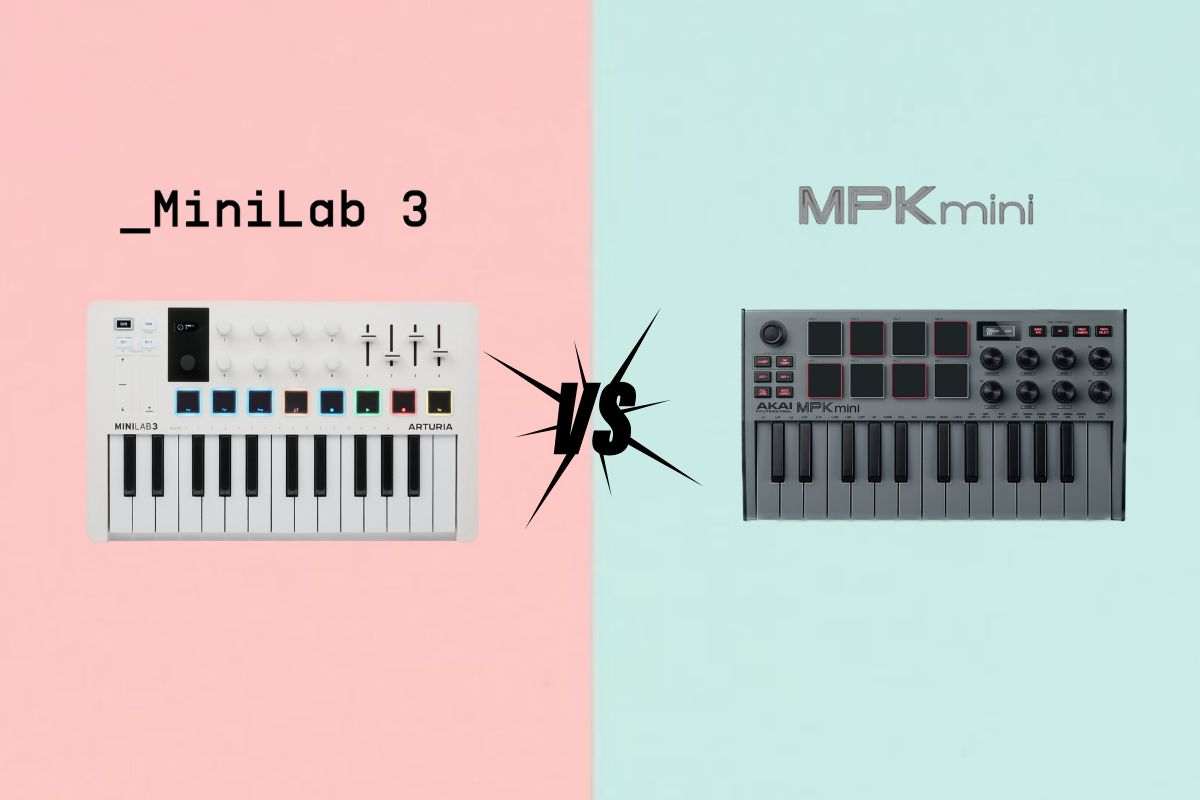
Comprehensive 2025 comparison of Arturia MiniLab 3 and Akai MPK Mini Mark III. Detailed analysis of keybeds, drum pads, features, and connectivity to help you choose the perfect entry-level MIDI keyboard for music production.
Arturia MiniLab 3 vs. Akai MPK Mini Mk3: Expert Comparison of the Best Entry-Level MIDI Keyboards
Introduction: The Ultimate Entry-Level Showdown
The Arturia MiniLab 3 and Akai MPK Mini Mark III represent the two most popular entry-level MIDI keyboards on the market today. For countless producers making their first controller purchase, the decision between these two exceptional options determines the foundation of their production setup.
This comprehensive comparison examines every critical difference to help you make the informed decision between these industry-leading mini MIDI keyboards.
Keybed Analysis: Foundation of Expression
Common Ground
Both keyboards feature 25 velocity-sensitive mini keys, establishing them as genuine musical instruments rather than mere trigger devices. However, the quality and feel of these keybeds differ in meaningful ways.
Akai MPK Mini Mark III Keybed
Akai’s Gen 2 Enhanced Dynamic Keybed represents a major focus of the Mark III redesign:
- Dramatically improved structural integrity over previous generation
- Solid, reliable feel without flimsiness
- Excellent key travel for mini-key format
- Responsive velocity sensitivity capturing playing dynamics
- Comfortable for extended playing sessions
These keys inspire confidence and enable expressive playing within the constraints of mini-key design.
Arturia MiniLab 3 Keybed
Arturia built their reputation partially on exceptional keybeds, and the MiniLab 3 maintains this tradition:
- Slightly superior dynamics with exquisitely dialed-in velocity response
- Premium playing experience exceeding price point expectations
- Marginally larger keys — approximately quarter-inch longer and fractionally wider
- Exceptional feel making extended playing sessions comfortable
Size Matters (Slightly)
The key size difference proves noticeable during use without being dramatic. The additional length and width enhance playing accuracy and comfort, particularly for players with larger hands or those transitioning from full-sized keyboards.
Verdict: Keybed Winner
Arturia MiniLab 3 maintains the slight edge in keybed quality. If playing experience represents your highest priority, the MiniLab’s superior dynamics and feel justify the choice. However, the gap narrows significantly with the MPK Mini’s Gen 2 improvements—both keyboards now offer legitimately excellent mini keybeds.
Drum Pads: Layout, Size, and Feel
Akai MPK Mini Mark III Drum Pads
Akai’s MPC heritage shines through in their drum pad implementation:
- Iconic MPC-style pads with professional feel
- Two-row layout (2×4 configuration) enabling thumb use
- Substantially larger than MiniLab pads
- Superior for finger drumming techniques
- Excellent velocity sensitivity capturing dynamic playing
- Red backlight illumination
Layout Advantages
The 2×4 pad arrangement provides genuine functional benefits:
- Natural thumb incorporation in drumming patterns
- Easier multi-pad combinations for complex rhythms
- Intuitive grid layout familiar to beat makers
Arturia MiniLab 3 Drum Pads
The MiniLab 3 features redesigned pads with modern features:
- Single-row layout with eight pads
- Noticeably smaller than MPK Mini pads
- RGB backlighting with customizable colors per pad
- Velocity-sensitive with adequate response
- Changed finger drumming experience due to layout
The smaller size and linear arrangement alter the tactile experience compared to the MPK Mini’s grid layout. While functional and responsive, the pads feel less oriented toward traditional finger drumming techniques.
Verdict: Drum Pad Winner
If finger drumming represents a significant part of your workflow, the Akai MPK Mini Mark III wins convincingly. The larger pads, superior layout, and MPC heritage create an unmatched experience at this price point.
Display Comparison: Visual Feedback
Purpose and Functionality
Both keyboards incorporate small displays providing visual feedback for:
- Velocity readouts when playing keys or pads
- Parameter values when adjusting knobs
- Current control assignments
- Feature settings (arpeggiator, etc.)
Screen Quality
Arturia MiniLab 3 edges ahead slightly with:
- Brighter display with better visibility
- Clearer font that’s easier to read at glance
- Fun animations adding personality (purely aesthetic)
The MPK Mini Mark III screen serves its purpose adequately, but the MiniLab 3’s superior brightness and readability provide better user experience during extended sessions.
Arpeggiator Comparison: Creative Pattern Generation
Both keyboards feature built-in arpeggiators—valuable tools for inspiration and production, even if not essential for every user.
Control Layout Differences
MPK Mini Mark III:
- All arpeggiator parameters visible simultaneously on screen
- Harder to read at glance due to dense information
- Keyboard shortcuts for direct parameter selection (divisions, modes, octaves, swing)
- Faster access once shortcuts are memorized
Arturia MiniLab 3:
- Screen changes contextually based on selected parameter
- Clearer individual parameter display
- Eight knobs dedicated to arpeggiator control
- More intuitive for new users
Both implementations work well, with the MPK favoring experienced users who memorize shortcuts and the MiniLab favoring clearer visual feedback.
Pitch and Modulation Controls
Akai MPK Mini: Four-Way Thumbstick
Akai’s signature joystick returns in the Mark III:
- Compact space-saving design
- Dual-axis control combining pitch and modulation
- Potential for accidental cross-triggering (pitch when wanting modulation, etc.)
- Intuitive once acclimated to the dual-function nature
The thumbstick proves easy to use with minor adjustment period. Accidental triggering becomes rare with experience.
Arturia MiniLab 3: Touch Strips
The MiniLab employs touch-sensitive strips:
- Separate controls eliminating accidental cross-triggering
- Smooth, responsive finger tracking
- Simple and effective operation
Both approaches work adequately without inspiring particular enthusiasm. Neither significantly outperforms the other.
Additional Controls and Features
Octave and Transpose
Both keyboards feature octave controls for extending playable range beyond 25 keys.
MiniLab 3 advantage: Octave buttons double as transpose controls, enabling key changes without menu diving.
Sustain and Chord Features
MiniLab 3 exclusive features:
- Hold button sustaining notes like sustain pedal
- Chord function (hold button secondary function) programming complete chords triggered by single keys
These creative features expand musical possibilities, particularly for producers less fluent in keyboard playing.
Transport Controls
MiniLab 3 exclusive: Dedicated transport controls (play, stop, record, cycle) enable DAW control directly from keyboard—convenient for hands-off-mouse workflows.
MPK Mini Mark III: Lacks dedicated transport controls, requiring computer interaction for recording functions.
Rotary Knobs and Faders
MPK Mini Mark III
- Eight endless encoder knobs
- Plastic construction with adequate feel
- Sufficient for most basic parameter control needs
Arturia MiniLab 3
- Eight endless encoder knobs
- Four faders providing additional control options
- Browser control knob for navigating Analog Lab presets
- Optimized for Analog Lab with dedicated parameter mapping
The additional faders and browser control provide MiniLab 3 users with enhanced mixing and sound design capabilities, particularly within Arturia’s software ecosystem.
Connectivity: Expanding Possibilities
MPK Mini Mark III Connectivity
- USB connection for MIDI and power
- Sustain pedal jack
- No MIDI output for hardware control
Arturia MiniLab 3 Connectivity
- USB-C connection for MIDI and power
- Sustain pedal jack
- MIDI output port for controlling hardware synthesizers and drum machines
MIDI Output Significance
The MiniLab 3’s MIDI output represents a significant advantage for producers expanding into hardware gear. This capability enables:
- Control of hardware synthesizers
- Triggering of hardware drum machines
- Integration with modular synthesis systems
- Future-proofing as your studio grows
For beginners, this feature may seem unnecessary. However, having this capability ensures the keyboard remains relevant as production skills and setups evolve.
Build Quality and Portability
Construction
Both keyboards feature predominantly plastic housing with similar weight and comparable build quality. Neither feels cheap or flimsy, representing appropriate construction for their price points.
Portability
Clear winner: Akai MPK Mini Mark III
The MPK Mini’s more compact dimensions make it significantly more portable. For producers frequently working in different locations or traveling with gear, the size difference becomes meaningful.
Pricing Considerations
At the time of comparison, both keyboards retail at similar price points, with the MiniLab 3 commanding a modest premium as the newer release. Price fluctuations occur regularly, so checking current pricing proves worthwhile.
Software Bundles
MPK Mini Mark III
- MPC Beats (free download beat-making software)
- Mini Grand and Velvet (piano sounds)
- Hybrid 3 (synthesizer)
Arturia MiniLab 3
- Analog Lab Intro (access to Arturia’s vintage keyboard and synth collection)
- Ableton Live Lite
- Additional Arturia software
The MiniLab 3’s Analog Lab inclusion provides superior long-term value, offering professional-quality sounds producers will genuinely use in productions.
Decision Framework: Which Should You Choose?
Choose Arturia MiniLab 3 If:
- Superior keybed matters — You prioritize playing experience
- MIDI output is important — You plan to use or might use hardware gear
- Additional controls appeal — Faders, transport controls, and chord features enhance your workflow
- Arturia ecosystem interests you — You use or plan to use Analog Lab and other Arturia software
- Visual clarity helps — The brighter display and clearer interface benefit your workflow
Choose Akai MPK Mini Mark III If:
- Drum pads are crucial — Superior pad size and layout benefit beat-making
- Maximum portability needed — Compact size enables true mobile production
- Finger drumming is primary — MPC-style pads provide unmatched performance
- Budget is tightest — Typically slightly less expensive
- Simpler is better — Straightforward feature set without complexity
Conclusion: Two Paths to Production Excellence
Both the Arturia MiniLab 3 and Akai MPK Mini Mark III represent outstanding entry-level MIDI keyboards. The choice between them depends on your specific production style, workflow preferences, and future plans.
The MiniLab 3 offers slightly superior playing experience, more extensive features, and future-proofing through MIDI output—ideal for producers prioritizing keyboard playing and versatility.
The MPK Mini Mark III delivers unmatched drum pads, maximum portability, and streamlined functionality—perfect for beat makers and mobile producers.
Neither choice disappoints. Both keyboards will serve as reliable production companions for years. The question isn’t which is better, but which better matches how you make music.
Related posts:
 Akai MPK Mini Plus vs. MPK Mini Play vs. MPK Mini Mk3: Complete Comparison Guide
 Arturia KeyStep Pro Review: Building the Ultimate Hybrid MIDI Controller Setup for Modern Production
 Akai Professional
 Numark Mixtrack Pro FX & Platinum FX Review: The Ultimate Entry-Level DJ Controllers for 2025
 Pioneer DJ DDJ-400 Review: The Perfect Entry-Level Rekordbox Controller for Aspiring DJs
 Pioneer DDJ-SB3 Controller Review: Entry-Level Excellence with Creative Pad Scratch
 Akai Professional APC64 Review: Next-Generation Ableton Live Controller
 Akai Force Standalone Sampler/Sequencer Review: The Ultimate Performance Workstation