

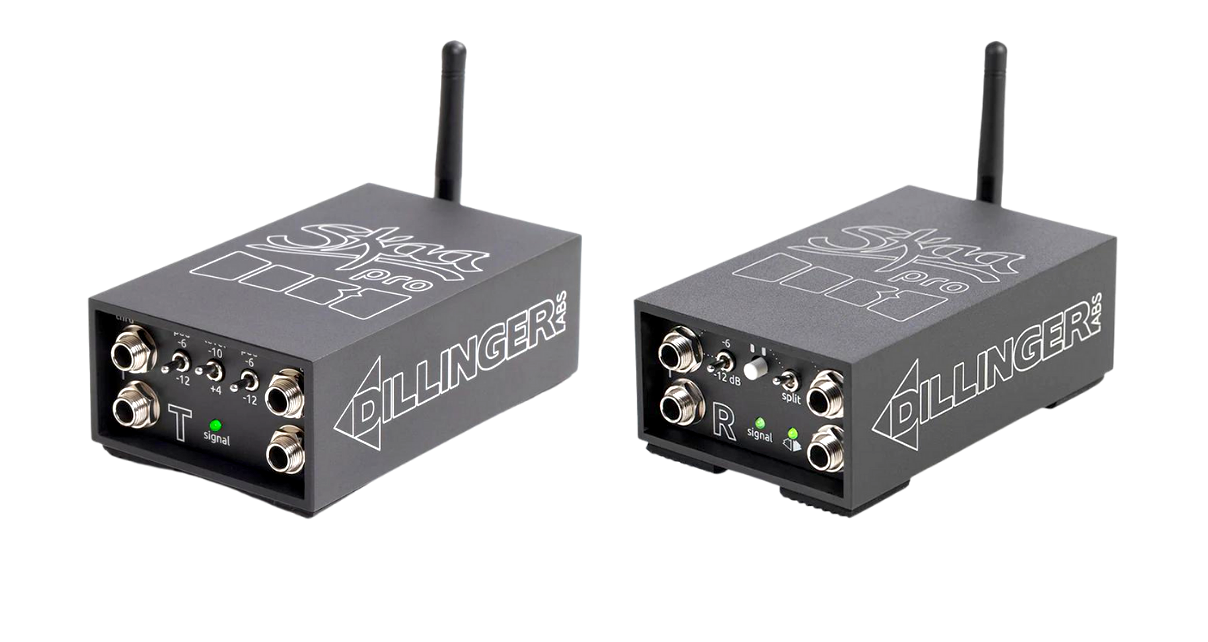
Complete review of Dillinger Labs Dani transmitter and Streetheart receiver wireless audio system. Discover if this SCAR Pro technology delivers truly professional wireless audio for DJs.
Dillinger Labs Dani and Streetheart Review: Professional Wireless Audio for DJs
Wireless audio transmission has long been the holy grail for mobile DJs and event producers. The ability to send high-quality audio across a space without running cables opens up creative possibilities and solves practical problems. However, most wireless solutions introduce too much latency or audio quality degradation to be useful for professional applications. Dillinger Labs attempts to solve this problem with their SCAR Pro technology, embodied in the Dani transmitter and Streetheart receiver.
Understanding the SCAR Pro Technology
SCAR Pro is Dillinger Labs’ proprietary wireless audio transmission protocol designed specifically for professional applications. Unlike Bluetooth, which introduces 40-50 milliseconds of latency and compresses audio, SCAR Pro operates at either 19 milliseconds (Pro mode) or 38 milliseconds (Normal mode) latency with no audio compression.
For context, 19 milliseconds is approaching the threshold of human perception for latency. While trained ears can detect it, it’s low enough for most professional applications. The 38-millisecond Normal mode is more noticeable but still significantly better than Bluetooth.
The system operates in the 2.4GHz frequency range and can transmit up to 50 meters indoors with line-of-sight. This range covers most practical DJ applications, from sending audio across a dance floor to connecting to speakers in different rooms.
Build Quality and Design
Both the Dani transmitter and Streetheart receiver are housed in solid metal enclosures that feel professional and durable. They’re compact—small enough to be truly portable but substantial enough to inspire confidence. Each unit features:
- Quarter-inch balanced TRS connections (some combo TRS/TS for flexibility)
- Pro/Consumer audio level switches
- Attenuation controls (-6dB and -12dB options)
- Signal indicator lights
- Battery level indicators
- Volume control (on transmitter)
- On/off switches
- Extended antennas for optimal transmission
The build quality suggests these units will withstand the rigors of professional use. Large rubber feet on the bottom prevent them from sliding on surfaces.
The Dani Transmitter
The transmitter is the heart of the system. It accepts stereo audio input via balanced quarter-inch TRS connections. One key feature is the throughput outputs—you can wire speakers directly to the transmitter, and the audio passes through untouched. This allows you to have both wired and wireless speakers in the same setup.
The transmitter includes pro/consumer level switching to match your source equipment, along with attenuation controls to optimize gain structure. A signal indicator light confirms when audio is present and being transmitted.
Battery life is rated at fourteen hours, which exceeds the duration of any realistic DJ performance. The transmitter charges via USB-C and can be operated while charging if needed.
The volume control serves multiple functions beyond just adjusting output level. It can mute the output and trigger various other functions depending on how it’s manipulated—a multi-function approach that requires consulting the manual initially but becomes intuitive with use.
The Streetheart Receiver
The receiver is equally well-built and features a more complex output configuration. It provides two stereo outputs (four total mono channels) that can be configured in multiple ways:
Standard Stereo Mode: Both output pairs carry the same stereo signal, allowing you to connect two sets of speakers or send to multiple destinations.
Dual Headphone Mode: The top outputs can be configured as two separate headphone jacks, each with independent volume control. A split button allows these to receive different sources.
Mixed Output Mode: You can configure different output levels and routing schemes for various monitoring scenarios.
This flexibility makes the receiver useful beyond simple PA speaker connection. For professional audio applications like studio monitoring, sending separate headphone mixes, or complex routing scenarios, the receiver offers substantial capabilities.
Pairing and Setup
Pairing the Dani and Streetheart is straightforward for basic DJ use: press the pairing button on the transmitter, press it on the receiver, and they link. The manual includes extensive instructions for more complex configurations involving multiple receivers or specialized routing, but for typical DJ applications (stereo in, stereo out), the process is simple.
Once paired, the units remember each other and reconnect automatically when powered on. The antennas should always point upward for optimal transmission.
Performance Testing
Testing focused on the two areas that matter most: audio quality and latency.
Audio Quality
Audio quality through the SCAR Pro system is excellent. Listening via high-quality headphones connected to the Streetheart receiver revealed no perceptible quality loss compared to the source material. The system transmits full-bandwidth, uncompressed audio that maintains all the detail and dynamics of the original signal.
For professional DJ applications, this quality is essential. You need to hear accurate bass response for beat matching, clear high frequencies for mixing percussion elements, and overall clarity for making performance decisions.
Latency Testing
Latency testing used a direct comparison approach: monitoring audio directly from a DJ controller via headphones while simultaneously listening to audio transmitted through the SCAR Pro system to a speaker.
In Pro mode (19 milliseconds latency), the delay is detectable when directly comparing the two sources. If you’re wearing headphones monitoring the direct signal and have a speaker nearby playing the wirelessly transmitted signal, you can hear that the speaker is slightly behind.
However, this is a test scenario. In practical use—where wireless speakers are positioned away from you and you’re monitoring through separate means—the latency becomes a non-issue. The delay is small enough that it doesn’t impact beat matching ability or overall performance quality.
For DJs accustomed to manual beat matching with headphones, there’s a slight adjustment period, but it’s workable. For DJs using sync and waveforms primarily, the latency is entirely unnoticeable.
In Normal mode (38 milliseconds), the latency becomes more noticeable and would likely bother most professional DJs. Pro mode is definitely the preferred setting for DJ applications, which limits you to two receivers per transmitter rather than four.
Practical DJ Applications
Mobile DJ Setup
The primary use case is mobile DJs who need to place speakers distant from their setup. Rather than running long XLR cables across a dance floor (which creates trip hazards and requires cable management), you can place the receiver near the speakers and transmit wirelessly.
The throughput feature means you can have monitor speakers wired directly to the transmitter while sending audio wirelessly to the main PA system. This gives you direct, zero-latency monitoring while still enjoying wireless PA connection.
Multi-Room Audio
For events spanning multiple rooms or areas, wireless transmission eliminates the need for extensive cable runs through doorways and hallways. Place a receiver in each area and transmit from a central DJ position.
Outdoor Events
For outdoor events where cable runs are impractical—beach parties, park events, temporary venues—wireless transmission is transformative. The fifty-meter range covers most outdoor event scenarios.
Integration with Wireless Speakers
Some speakers, particularly those from SoundBoks, have SCAR Pro receivers built in. These speakers can receive audio directly from the Dani transmitter, and then communicate with each other to create a multi-speaker system without any cables.
This opens up interesting possibilities. You could use a battery-powered DJ controller (like the Denon DJ Prime GO) with SCAR Pro-enabled battery-powered speakers to create a completely wireless, completely portable DJ system—ideal for beach parties, outdoor events, or anywhere without power infrastructure.
You could also add a wired subwoofer to this wireless setup by connecting the Streetheart receiver to the subwoofer, creating a 2.1 system with the wireless stereo speakers and wired sub.
Limitations and Considerations
While the SCAR Pro system works well, it’s not perfect for all scenarios:
Latency is Noticeable: Even at 19 milliseconds, trained DJs can detect the latency when directly comparing wired and wireless signals. It’s workable but not truly zero-latency.
Not for Wireless Headphones: While the system technically supports headphones via the Streetheart’s headphone mode, the latency is too high for comfortable DJ headphone monitoring. Dedicated wireless headphone systems (like those from AIAIAI) offer lower latency for this specific use.
Requires Line-of-Sight: The 2.4GHz transmission works best with clear line-of-sight. Obstacles, walls, and interference from other wireless devices can impact range and reliability.
Pro Mode Limits Receivers: Using the low-latency Pro mode limits you to two receivers. For larger installations requiring more receivers, you must use Normal mode with its higher latency.
Comparison to Alternatives
For DJs seeking wireless audio transmission, few alternatives exist at this professional level:
Bluetooth: Too much latency and audio compression for professional use.
AIAIAI W+ System: Lower latency (1.6 milliseconds) but primarily designed for speakers with the receiver built-in. The AIAIAI Unit-4 speakers use this technology.
AlphaTheta SonicLink: Similar ultra-low latency to AIAIAI, currently available in AlphaTheta’s wireless headphones and Wave-DJ speakers.
The Dillinger Labs system sits between Bluetooth (unusable for DJing) and newer ultra-low-latency systems. It works for DJ applications but isn’t quite as refined as newer competing technologies.
Value Proposition
At the price point for both transmitter and receiver, you’re making a significant investment. The question is whether eliminating cable runs justifies the cost for your specific applications.
For mobile DJs who frequently set up in challenging venues, the time saved and increased safety from eliminating cable runs could justify the investment. For DJs who primarily work in traditional venues with standard PA cable runs, the value is harder to justify.
The build quality and audio quality are professional-grade. These aren’t consumer products that will fail after a few uses—they’re built for professional applications and should last for years of regular use.
Final Verdict
The Dillinger Labs Dani transmitter and Streetheart receiver successfully deliver professional wireless audio transmission suitable for DJ applications. The audio quality is excellent, the build is solid, and the battery life is adequate for any realistic use case.
The 19-millisecond latency in Pro mode is low enough for professional DJ work, though it is still detectable. For DJs who need wireless audio transmission and can work within the system’s constraints, it’s one of the best solutions currently available.
However, newer competing technologies from AIAIAI and AlphaTheta offer lower latency, and they’re beginning to appear in various products. If those products fit your needs, they may offer superior performance.
The Dillinger Labs system makes most sense for DJs who need the flexibility of standalone transmitter/receiver units rather than integrated wireless speakers, and who need professional audio quality with acceptable (though not imperceptible) latency. It’s a solid professional tool that solves real problems, even if it’s not the absolute cutting edge of wireless audio technology.
Related posts:
 SKAA Pro Streetheart Review: Professional Wireless Audio For Any DJ Setup
 PRO Wireless Audio for DJs: The SKAA Pro System and Dani Transmitter Revolution
 SKAA Pro Review: The Future of Wireless DJ Audio?
 XVIVE U3 Wireless System Review: Make Any Speaker or Microphone Wireless
 AIAIAI TMA-2 Studio Wireless+ Headphones Review: The World’s First Latency-Free Wireless DJ Headphones
 WAVE EIGHT Speaker Review: Wireless Freedom, DJ-Ready Sound—But Not Perfect
 AlphaTheta HDJ-F10 Review: Wireless Freedom for the DJ Booth
 AIAIAI Unit-4 Wireless Speaker Review: The Ultimate Portable Studio Monitor for DJs and Producers