

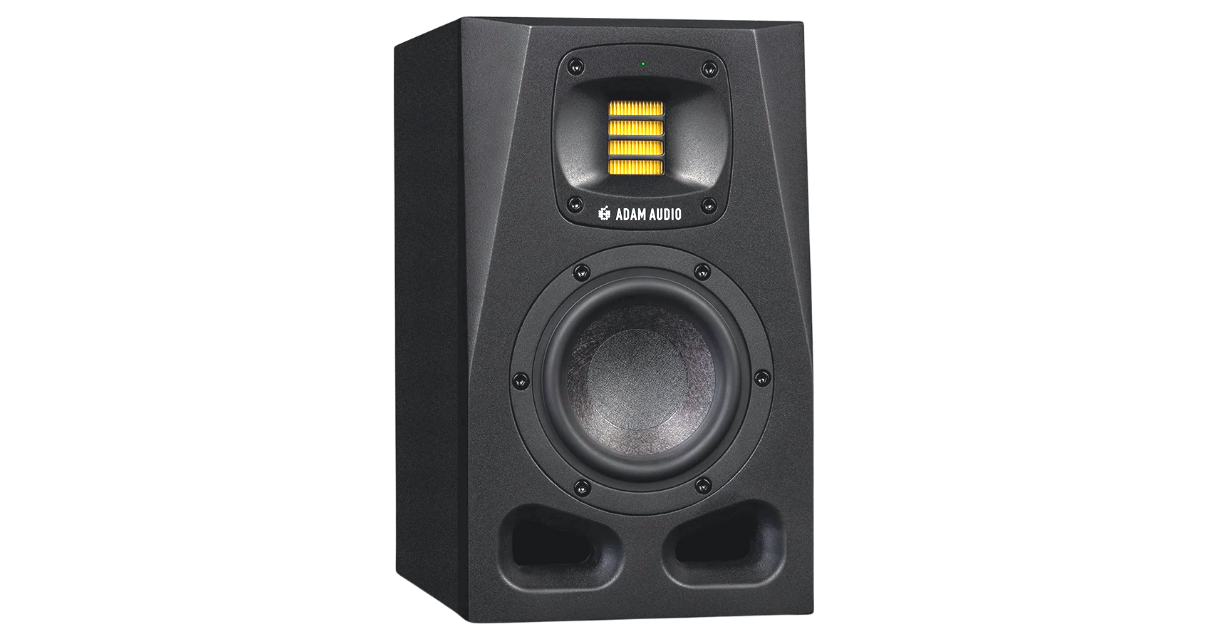
In-depth review of Adam Audio A4V studio monitors with DSP room correction. Discover how these smart speakers deliver customized sound for DJ producers in any room.
Adam Audio A4V Studio Monitors Review: Smart Speakers with Custom Sound
Studio monitors have traditionally been straightforward devices: plug them in, adjust the volume, and hope your room acoustics don’t destroy the frequency response. The Adam Audio A4V monitors represent a dramatically different approach, incorporating extensive digital signal processing, network connectivity, and sophisticated room correction technology to deliver genuinely customized sound for your specific listening environment.
Design and Build Philosophy
The A4V monitors are compact near-field speakers that immediately communicate professional intent. They’re reassuringly heavy, solidly constructed, and finished in a no-nonsense matte aesthetic. The front of the speaker features Adam Audio’s signature folded ribbon tweeter alongside a four-inch mid-range/bass driver, giving the A4V its name.
One thoughtful design element: the tweeter can be rotated, allowing the speakers to work equally well in horizontal or vertical orientations. The dispersion pattern adjusts based on tweeter orientation, ensuring optimal sound regardless of how you position the speakers.
The front porting (twin ports at the bottom) allows the speakers to be placed closer to walls without bass buildup, a practical consideration for small studios where space is limited.
Connectivity and Controls
The rear panel reveals where the A4V diverges from traditional monitors. Beyond the expected inputs (both XLR and RCA, switchable via button), you’ll find:
- Gain control (±12 decibels from unity)
- Voicing button with multiple modes
- Four-band physical EQ controls (bass, low-mid, high-mid, treble)
- Ethernet port for network connectivity
Each speaker is individually powered with its own IEC power input. The A4V uses a Class AB amplifier for the tweeter and Class D for the mid-range/bass, delivering a total of 105 watts RMS per speaker.
The Voicing System
The voicing button provides three distinct operating modes:
Pure Mode: Flat frequency response with no processing—what you put in is what you get out.
UNR Mode: Mimics the sound signature of Adam Audio’s heritage AX series speakers. If you loved the AX sound but want modern features, this mode provides that familiar character.
External Mode: Disables the physical EQ controls and allows the speaker to be controlled entirely via network software—more on this later.
The four-band EQ provides useful room adaptation even without diving into the advanced features. You can boost or cut bass, adjust low-mids, tune high-mids, and tweak treble—all via physical buttons on the rear panel. While not as precise as digital EQ, these controls help compensate for room acoustics.
Network Control and Software
Connecting the A4V monitors to your network via Ethernet unlocks their true potential. The A Control software allows you to adjust all speaker parameters from your listening position—a seemingly small feature that makes a huge difference in practice.
Traditionally, tuning studio monitors means walking behind them, adjusting controls, returning to your listening position to evaluate the change, then repeating the process. With A Control, you sit in your optimal listening position and adjust settings in real-time while hearing the results. This dramatically simplifies the tuning process.
The software also provides access to advanced tuning features including six-band parametric EQ with shelving and filter options. This level of control allows precise room correction and sound customization impossible with physical controls alone.
Room Correction: The Sonarworks Integration
The most advanced feature of the A4V system is room correction via Sonarworks integration. This process uses a measurement microphone to analyze your room’s acoustic characteristics and create a correction profile.
The process works as follows:
- Purchase or borrow a measurement microphone (Adam Audio provides some usage time with Sonarworks platform access)
- Install the Sonarworks software and connect your measurement microphone
- Follow the software’s instructions to measure your room from multiple positions
- The software analyzes the measurements and creates a correction profile
- Upload this profile directly to the speakers via Ethernet
Once uploaded, the speakers themselves apply the correction in real-time. This is the critical difference from traditional Sonarworks implementations: the correction lives in the speakers, not in software running on your computer.
This means any source playing through these speakers—record decks, DJ controllers, audio interfaces, anything—benefits from the room correction. You’re not limited to correcting only what plays through your computer.
The Room Correction Experience
Completing the room correction process requires patience. It takes approximately thirty minutes of careful measurement, and it may require several attempts to achieve optimal results. The process involves:
- Positioning the microphone at your exact listening position
- Moving to various positions throughout your listening area
- Allowing the software to play test tones and calibration signals
- Analyzing the results and uploading the correction profile
The results are subtle but meaningful. Comparing the corrected profile to uncorrected sound reveals more presence, better clarity, and improved engagement with the music. The correction doesn’t dramatically change the sound—it refines it, bringing it closer to an ideal flat response for your specific room.
Sound Quality
Even without room correction, the A4V monitors sound excellent. They deliver the clarity and detail you’d expect from professional studio monitors in this class. The folded ribbon tweeter provides crisp, detailed high-frequency reproduction without harshness. The mid-range is present and accurate, while the bass response is impressive for a four-inch driver, particularly when properly positioned.
After breaking in the speakers (Adam Audio recommends eight hours of initial use), they open up and become more refined. The sound is neutral enough for critical mixing decisions while remaining engaging for extended listening sessions.
For DJ/producers, these speakers provide accurate monitoring across the frequency spectrum. Kick drums have punch without being overhyped. Hi-hats and cymbals shimmer without being shrill. Bass lines are clear and defined. The overall presentation allows confident mixing decisions.
Positioning Matters
Like all studio monitors, proper positioning is crucial for optimal performance. The A4V should be positioned at ear height, angled to point directly at your listening position, and placed equal distances from you (forming an equilateral triangle with your head).
The review setup used speaker stands to achieve proper height and positioning. Once correctly positioned, the room correction features can fine-tune for the remaining acoustic issues. However, no amount of room correction can fix poor speaker placement—get the physical positioning right first.
Who Needs This Level of Sophistication?
The A4V’s advanced features aren’t necessary for every user. DJs who only need basic monitoring for preparing sets probably don’t need network connectivity and room correction. The sophistication and cost make sense primarily for:
DJ/Producers: If you’re producing music and need accurate monitoring for mixing decisions, the room correction ensures what you hear translates well to other systems.
Small Studio Owners: If you work in less-than-ideal acoustic spaces (bedrooms, small rooms with limited treatment), room correction helps compensate for acoustic problems.
Professionals Seeking Accuracy: If your income depends on making good mixing decisions, investing in accurate monitoring makes financial sense.
Technology Enthusiasts: If you enjoy the process of optimizing and fine-tuning your equipment, the A4V provides extensive adjustment capabilities.
Alternatives to Consider
For DJs who want room correction without the complexity and subscription costs of Sonarworks, IK Multimedia’s iLoud monitors offer an alternative approach. They include a measurement microphone and handle room correction entirely through the speakers themselves, with no computer software or subscriptions required. They’re also more portable if you need monitors that work well in different locations.
For pure sound quality without the smart features, numerous competitors at various price points deliver excellent performance. The A4V’s value proposition centers on its advanced features—if you won’t use them, simpler monitors may serve you better.
The DSP Advantage
All the adjustability in the A4V—the voicing modes, EQ controls, room correction—relies on the powerful DSP (Digital Signal Processing) built into each speaker. This DSP allows the speakers to perform complex audio processing in real-time without latency or degradation.
This represents a significant advancement in studio monitor technology. Rather than being passive devices that simply reproduce what they receive, the A4V actively processes audio to compensate for room acoustics and deliver optimal sound.
Practical Considerations
The room correction profile is stored in the speakers, which means moving them to a different room or significantly changing their position requires creating a new correction profile. If you frequently move your monitors, the correction features become less useful.
The Sonarworks subscription typically isn’t required long-term. Once you’ve created your room correction profile and uploaded it to the speakers, you don’t need to maintain the subscription unless you move your setup and need to create a new profile.
The Ethernet connectivity requires running network cables to each speaker, which adds some cable management complexity compared to monitors that only require power and audio cables.
Final Verdict
The Adam Audio A4V monitors represent a new category of smart studio monitors that actively adapt to your room and provide extensive customization options. For DJ/producers working in small studios who need accurate monitoring, they deliver genuine value through their room correction capabilities.
The sound quality is excellent even without engaging the advanced features. The build quality is professional-grade. The flexibility of positioning (horizontal or vertical) and the comprehensive connectivity options make them practical for various setups.
However, these features come at a premium cost. For users who won’t utilize the network control, room correction, or advanced EQ features, excellent alternatives exist at lower prices. The A4V makes most sense for users who will actually leverage its smart capabilities.
If you’re a DJ/producer committed to accurate monitoring and willing to invest time in properly calibrating your listening environment, the Adam Audio A4V delivers genuinely superior results. The ability to correct for room acoustics without requiring software running on your computer is unique and valuable. For the right user in the right circumstances, these monitors can genuinely improve the quality of your mixing decisions and, ultimately, your final productions.
Related posts:
 ADAM Audio H200 Review: Studio-Grade Precision in a Closed-Back Design
 Etymotic ER3XR In-Ear Monitors Review: Audiophile Sound Quality for Music Lovers and Producers
 KRK Rokit 5 G4 Studio Monitors Review: Enhanced Features and Warm Sound
 Headphones vs Studio Monitors: 4 Essential Considerations for Audio Production
AIAIAI Unit-4 Wireless Speaker Review: The Ultimate Portable Studio Monitor for DJs and Producers
Headphones vs Studio Monitors: 4 Essential Considerations for Audio Production
AIAIAI Unit-4 Wireless Speaker Review: The Ultimate Portable Studio Monitor for DJs and Producers
 Adam Audio H200 Review: Producer-Oriented Closed-Back Headphones for DJs
 KRK Go:aux 4 Review: Portable Monitors Tuned for DJs on the Go
 KRK Classic 5 Monitors and 8S2 Subwoofer Review: Perfect Starter Studio System for DJs