

Complete review of the Roland GO:Mixer Pro audio interface designed for iOS, Android, and laptop DJ streaming. Analysis of inputs, outputs, versatility, and practical applications for mobile DJs.
Roland GO:Mixer Pro Review: Versatile Audio Interface for DJ Live Streaming
The Critical Importance of Audio Quality in DJ Streaming
Live streaming has become an essential tool for DJs to build audiences, maintain connections with fans, and expand their reach beyond physical venues. While video quality matters, audio quality is paramount—viewers will forgive grainy video from mobile devices, but poor audio renders a DJ stream essentially worthless. The Roland GO:Mixer Pro addresses this foundational requirement by providing a comprehensive audio interface solution for DJs streaming from smartphones, tablets, or laptops.
The GO:Mixer Pro is designed primarily for iOS and Android mobile devices but functions equally well with laptop computers, making it a versatile addition to any streaming-focused DJ setup.
Physical Design and Build Quality
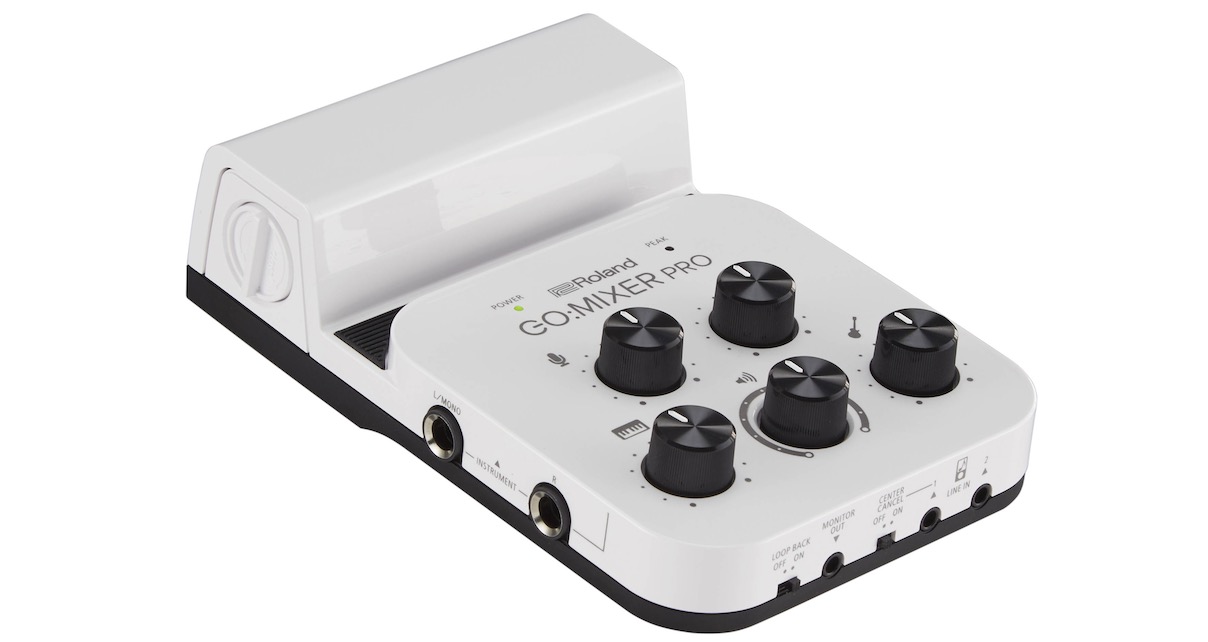
The GO:Mixer Pro is compact, lightweight, and constructed entirely from plastic—a material choice that might raise concerns at the price point. However, the plastic feels reasonably sturdy with sturdy rubber feet on the bottom that prevent shifting during use. While it won’t win awards for premium construction, it appears durable enough for regular use with reasonable care.
A distinctive feature is the integrated phone mount that holds iOS devices upright, creating a compact streaming station. The mounting system accommodates phones and iPad Minis comfortably, though larger iPad Pro models might create stability concerns due to their size and weight. The mount positions devices vertically with the cable routing neatly from the device to the back of the unit.
Connection Cables and Compatibility
The GO:Mixer Pro includes cables for both Android and iOS devices: a USB-C cable and a mini USB cable. These enable plug-and-play connection to most modern mobile devices. However, no laptop connection cable is included—users wanting to connect to computers need to supply their own mini USB to USB cable.
This omission is understandable given the mobile-first design philosophy, though including a laptop cable would add value for users wanting multi-platform compatibility.
Control Layout and Inputs
The top panel features five knobs: four controlling individual inputs and one master volume control. A simple LED serves as a peak meter, flashing when input levels approach clipping. A power LED indicates device status. The monitoring capabilities are deliberately basic—no detailed metering, just essential feedback on power and peak level.
Input Configuration
Side Panel Quarter-Inch Inputs:
- Left and right quarter-inch inputs for DJ controllers or other line-level instruments
- These map to a dedicated input knob on the top panel
- Standard for connecting DJ controllers via their RCA or quarter-inch outputs
Additional Side Inputs:
- Two microphone inputs (XLR or quarter-inch)
- Guitar/bass input (mono quarter-inch jack, potentially usable as additional mic input)
- All these inputs have corresponding control knobs on the top panel
Front Panel 3.5mm Inputs:
- Two stereo 3.5mm line-level inputs
- No dedicated control knobs—volume controlled by source device or master volume
- Useful for adding additional stereo sources like mobile devices, drum machines, etc.
This input array provides remarkable versatility, allowing DJs to create complex multi-source streams incorporating DJ controllers, microphones, additional players, and backing devices.
Output Configuration
Digital Output: The mini USB jack serves as the primary output, converting all analog inputs to digital and transmitting to the connected device (phone, tablet, or laptop). This is the core audio interface functionality.
Monitor Output: An 3.5mm (eighth-inch) stereo jack provides crucial monitoring capability. This output is essential for DJs using controllers without dedicated monitor outputs. Many compact DJ controllers feature only a single stereo output pair (typically RCA). Without the GO:Mixer Pro’s monitor output, DJs would have no way to hear their mix through speakers while simultaneously sending audio to a streaming device.
The monitor output accepts standard 3.5mm stereo cables, which can connect to powered speakers, headphone amplifiers, or other monitoring solutions. This elegant feature solves the single-output-controller problem that plagues many mobile DJ setups.
Power Management
The GO:Mixer Pro draws power from the connected device when plugged into phones, tablets, or laptops via the mini USB connection. This simplifies setup but creates a battery drain concern for mobile devices.
To address this, the unit includes a battery compartment accepting four AAA batteries. A rear-panel switch activates battery power, preserving the connected device’s battery life during extended streams. The battery power also provides phantom power for condenser microphones requiring it—relevant for musicians but less critical for typical DJ applications.
A rechargeable battery or AC power input option would feel more premium than disposable AAA batteries. However, the battery solution works reliably and ensures portability without requiring outlets.
Additional Features
Loopback Button: This routes audio from the connected device back into the mix. Useful for including playback audio from the streaming device itself, though less relevant for typical DJ streaming.
Center Cancel: This feature reduces vocal presence on one of the line inputs—essentially a karaoke function that diminishes lead vocals while preserving instrumental tracks. Karaoke DJs will appreciate this inclusion, while others may never use it.
While these features expand the GO:Mixer Pro’s versatility beyond pure DJ applications, they’re secondary to the core audio interface functionality most DJ streamers require.
DJ-Specific Applications
Streaming from Mobile Devices with Audio
For DJs wanting to stream directly from smartphones or tablets to platforms like Mixcloud Live, Twitch, Facebook Live, or Instagram:
- Mount phone/tablet on the integrated stand
- Connect DJ controller outputs to the GO:Mixer Pro’s quarter-inch or 3.5mm inputs
- Connect GO:Mixer Pro to mobile device via included cable
- Connect GO:Mixer Pro’s monitor output to speakers
- Launch streaming app on mobile device
- Select GO:Mixer Pro as audio input
- Begin streaming
This configuration creates a complete, self-contained streaming solution without requiring a laptop computer. The camera on the mobile device captures video while the GO:Mixer Pro provides clean audio—a genuinely integrated mobile broadcast station.
Roland offers companion apps that add visual effects and additional features, though these are optional rather than essential for basic streaming functionality.
Streaming from Laptops
When streaming from the same laptop used for DJ software, some DJs can route audio internally using software solutions like Loopback (Mac) or VoiceMeeter/BlackHole (Windows/Mac) without requiring a hardware audio interface at all.
However, best practices recommend streaming from a separate computer to avoid overloading the DJ laptop with encoding overhead. For dual-computer setups:
- Connect DJ controller to DJ laptop (running DJ software)
- Connect DJ controller outputs to GO:Mixer Pro inputs
- Connect GO:Mixer Pro to streaming laptop via USB
- Configure streaming software (OBS, etc.) to use GO:Mixer Pro as audio source
- Set DJ laptop as dedicated performance machine, streaming laptop handles encoding/broadcast
This separation ensures consistent DJ software performance without streaming overhead impact while maintaining clean audio routing.
Versatility Beyond DJ Applications
The multiple inputs enable creative streaming scenarios:
- Multi-DJ Sessions: Connect a second DJ controller to the 3.5mm inputs, allowing smooth transitions between DJs during stream
- Live Musicians: Connect instruments or microphones for live performance elements
- Hybrid Sets: Integrate drum machines, samplers, or synthesizers alongside DJ controller outputs
- Podcast Production: Use multiple microphones for interview or discussion formats
This versatility means the GO:Mixer Pro serves multiple roles beyond pure DJ streaming, potentially justifying its place in diverse content creation workflows.
Monitoring and Audio Quality
Users report the sound floor (background noise level) is present but not distractingly high—acceptable for live streaming applications though not silent enough for pristine studio recording. Musicians and audio perfectionists note this limitation, but for DJ streaming purposes where some environmental noise is expected, the noise floor proves acceptable.
The lack of detailed metering beyond a single peak LED is limiting—more comprehensive level displays would improve setup confidence, but the basic feedback suffices for most users once initial levels are established.
Software Integration and Roland Ecosystem
Roland provides several companion apps designed to enhance the GO:Mixer Pro experience, including visual effect apps and recording utilities. While these add value, they’re not essential—the device functions perfectly well as a straightforward audio interface without Roland’s proprietary software.
The company’s focus on mobile content creation shows in these software offerings, though DJs may find them less relevant than musicians or podcasters who might use the device differently.
When the GO:Mixer Pro Makes Sense
Ideal For:
- DJs streaming from mobile devices (phones/tablets)
- Dual-computer streaming setups requiring audio interfaces
- DJs with single-output controllers needing monitor outputs
- Mobile DJ producers seeking portable interface solutions
- Content creators needing multiple input flexibility
- Karaoke DJs (center cancel feature)
- Multi-DJ collaborative streams
Less Ideal For:
- DJs streaming from the same laptop running DJ software (software routing may suffice)
- Studio producers needing pristine, silent noise floors
- Users requiring extensive metering and level visibility
- Those on extremely tight budgets
Pros and Cons
Advantages
- Designed specifically for mobile device integration
- Excellent input versatility (six total inputs)
- Crucial monitor output solves single-output-controller problem
- Works with iOS, Android, and computers
- Integrated phone/tablet stand
- Battery power option preserves device battery
- Provides phantom power for condenser mics
- Compact and portable
- Multiple simultaneous input mixing
- Included mobile device cables
Disadvantages
- All-plastic construction feels less premium than price suggests
- Basic metering (single peak LED)
- Some users report noticeable sound floor
- Battery power via AAA batteries rather than rechargeable
- No laptop connection cable included
- Center cancel and loopback features unnecessary for many DJs
Final Verdict
The Roland GO:Mixer Pro successfully addresses the core challenge DJ streamers face: getting clean, professional audio from DJ equipment into streaming applications on mobile devices or computers. The integrated stand, versatile inputs, and critical monitor output create a purpose-built streaming solution that eliminates much of the improvisation typically required for mobile streaming setups.
Build quality won’t impress those seeking premium construction, and the basic metering frustrates users wanting detailed level visibility. However, these limitations don’t prevent the device from fulfilling its primary function effectively. The sound quality proves adequate for streaming applications, and the flexibility to connect multiple sources enables creative streaming scenarios beyond basic DJ sets.
For DJs seriously pursuing mobile-device streaming, the GO:Mixer Pro removes significant barriers and enables professional audio quality without laptop requirements. The integrated stand isn’t just gimmicky—it creates a genuinely cohesive mobile broadcast station that simplifies setup and improves portability.
The price point positions it as a mid-range investment that provides tangible value for working DJs who stream regularly. While software solutions exist for single-laptop streaming and cheaper interfaces are available, the GO:Mixer Pro’s mobile-first design and input versatility justify the premium for DJs prioritizing mobile streaming or dual-computer setups.
Recommended for DJs streaming from mobile devices, those using dual-computer streaming configurations, and anyone needing a portable, versatile audio interface that accommodates DJ-specific workflows. The GO:Mixer Pro represents a well-designed tool that solves real problems for its target audience, making it a worthy addition to the streaming DJ’s toolkit.
Related posts:
 Roland Go:Mixer Pro-X Review: Essential Audio Interface for DJ Livestreaming
 iRig Pro Quattro I/O Audio Interface Review: The Ultimate DJ Add-On Device?
 Mackie M-Caster Live Review: The DJ’s Streamer-Friendly Audio Interface
 Howler Recorder and Streamer Review: The Compact Audio Interface Solution for DJs
 NearStream VM33 Wireless Camera Review: Simplified Live Streaming for DJs
 UDG Ultimate DIGI Backpack Review: Fit Your Full Live-Streaming DJ Rig
 Arturia AudioFuse Audio Interface Review: Professional Studio Connectivity Redefined
 Fosi Audio GR40 Tube DAC Preamp Review: Versatile Audio Performance Tested