
Detailed review of the Howler recorder and streamer—a specialized two-channel audio interface for DJ recording and live streaming. Explore the versatile connectivity, recording capabilities, and practical applications.
Howler Recorder and Streamer Review: The Compact Audio Interface Solution for DJs
Solving the DJ Recording and Streaming Audio Problem
The Howler is a compact, specialized device addressing a persistent challenge faced by DJs: getting clean audio from DJ equipment into recording devices or live streaming setups. This small box serves dual purposes—recording DJ sets directly to an internal SD card and functioning as a two-channel audio interface for streaming applications. Its design philosophy centers on solving specific DJ workflow problems rather than being a general-purpose audio tool.
Hardware Design and Physical Interface
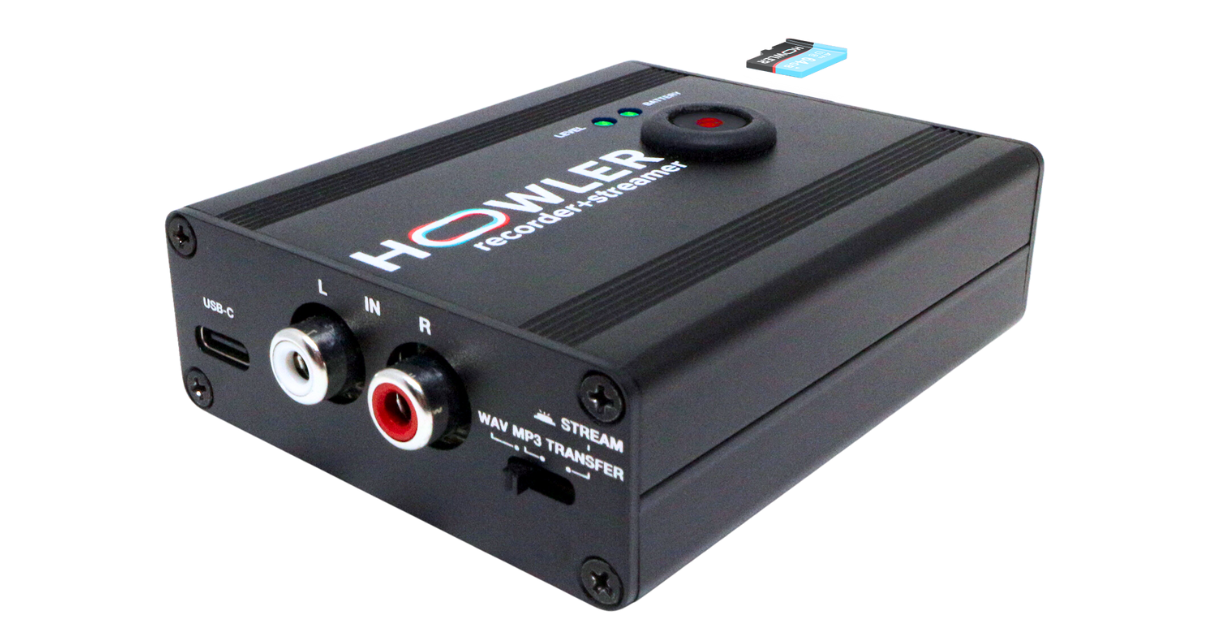
The Howler’s compact form factor belies its functionality. The top surface features a prominent record button flanked by two LED meter displays—a battery meter indicating charge status and a level meter showing incoming audio levels and potential clipping.
One side panel houses a USB-C socket (serving multiple critical functions), a pair of RCA input jacks, and a mode switch toggling between recording and streaming functions. The opposite side contains the on/off button, a micro SD card slot (with a 64GB card pre-installed), and RCA through-output jacks.
The build quality feels substantial and purposeful—this is clearly a device designed for the rigors of gigging rather than a fragile studio-only tool.
USB-C: The Multi-Purpose Connection
The USB-C port serves three distinct functions, each addressing different use cases:
1. Charging: Standard USB-C power input charges the internal battery in approximately two hours. Battery life extends to an impressive 30-40 hours of recording or streaming—far exceeding typical DJ set durations or even marathon recording sessions.
2. Computer Interface: When connecting to computers for live streaming, the Howler appears as a standard two-channel audio interface. Streaming software like OBS immediately recognizes it as an audio input source, enabling clean DJ audio integration into broadcasts without complex routing configurations.
3. File Transfer: After recording to the internal SD card, connecting the Howler to a computer via USB-C mounts it as an external drive. Recorded files can be dragged directly to the computer without removing the SD card—a convenience that streamlines workflow considerably.
Available Cables and Connectivity Options
The company offers several optional cables addressing different connectivity scenarios:
Camera Connection Kit (Lightning): For iPhone 14 and earlier devices using Lightning connectors, this cable (similar to Apple’s official Camera Connection Kit but more affordably priced) ensures proper signal routing to iOS devices. iPhone 15 and newer models use standard USB-C and don’t require this adapter.
Dual USB-C Power Splitter: This cable addresses a common problem—simultaneously powering both the connected phone/tablet and the Howler during extended streaming sessions. The splitter allows a single power source to trickle-charge both devices, eliminating battery anxiety during long broadcasts.
These cables aren’t included but are reasonably priced additions that solve real-world problems DJs encounter.
Recording Function
Recording operation is deliberately simple:
- Power on the device (on/off button on side panel)
- Check battery status on top LED meter
- Select WAV or MP3 format using the mode switch
- Press the large record button on top
- Recording begins (button flashes during recording)
- Press record button again to stop
The recorded files save directly to the internal micro SD card. The format choice (WAV for quality, MP3 for smaller file sizes) accommodates different needs—archival recordings versus quick social media posts, for example.
The through-output RCA jacks solve a critical problem: many DJ controllers and compact mixers have only one stereo output pair. The Howler’s through jacks allow DJs to monitor their mix on speakers while simultaneously recording, eliminating the need for equipment with multiple outputs.
Streaming Mode
Setting the mode switch to “Stream” disables recording and configures the device as a pure audio interface. In this mode, audio from the RCA inputs passes through the USB-C connection to whatever device is connected—laptop, tablet, or smartphone.
This streaming mode eliminates the need for complex audio routing. Plug the Howler into RCA outputs on DJ equipment, connect USB-C to the streaming device, select the Howler as the audio input in streaming software, and audio flows cleanly with proper levels.
Real-World Application Scenarios
Scenario 1: Recording Sets with Single-Output Controllers
Many entry-level and mid-range DJ controllers feature only one stereo output pair. DJs wanting to record their sets face a dilemma—connect to speakers or connect to a recording device? The Howler solves this elegantly. Plug controller outputs into the Howler’s inputs, connect Howler’s through-outputs to speakers, press record. The DJ hears the mix through speakers while the Howler captures the audio to SD card.
This is particularly valuable for DJs using streaming services (Tidal, Beatport Streaming, etc.) in their DJ software. These services typically disable in-software recording functionality—the Howler captures the actual audio output, bypassing this restriction entirely.
Scenario 2: Recording All-Night Events
For DJs hosting parties, events, or warehouse sessions where multiple DJs play throughout the night, the Howler provides a cassette-deck-like solution for modern times. Connect it to the record output of any professional mixer, press record, and let it run. The 30-40 hour battery life and 64GB storage capacity can capture entire events without intervention.
The recording documents the complete event for posterity, promotional use, or personal archives without requiring anyone to monitor recording levels or flip tapes (as in the literal cassette-deck days).
Scenario 3: Dual-Laptop Streaming Setup
Many DJ streamers use separate laptops—one for DJ software and music playback, another for streaming software and broadcast management. This separation prevents performance issues from overloading a single computer.
Getting audio from the DJ laptop to the streaming laptop typically requires a separate audio interface. The Howler serves this role perfectly. Connect it to the DJ controller outputs, set to streaming mode, USB cable to the streaming laptop, and the streaming software immediately sees clean stereo DJ audio as an input source.
Microphones plugged into the DJ controller (if it has mic input) or mixer automatically pass through to the stream, solving the commentary/announcements requirement without additional complexity.
Comparison with Competing Products
iRig Stream: The iRig Stream offers similar functionality in a comparably portable form factor. It features more controls and switches, though many of these address scenarios less relevant to DJs. Build quality feels adequate but less robust than the Howler. Price point is similar.
Zoom H6 or Similar Field Recorders: Professional field recorders offer superior recording quality and more inputs but at significantly higher price points with far greater complexity and bulk. They’re overkill for DJ recording needs unless multi-input recording of live performances with musicians is required.
Vintage Solutions (Evermix Box): The fondly-remembered Evermix Box provided similar functionality in a compact package but is no longer manufactured. The Howler effectively replaces this discontinued solution, filling the void it left in the market.
Most general-purpose audio interfaces target music production rather than DJ applications. They feature phantom power for studio microphones, multiple input channels, and other capabilities DJs don’t need. They’re also typically larger, require external power, and cost more than DJ-focused solutions like the Howler.
Limitations and Considerations
No Simultaneous Record and Stream: The mode switch requires choosing between recording or streaming—simultaneous operation isn’t supported. This represents the most significant functional limitation.
A workaround exists for dual-laptop streamers: use the Howler in streaming mode connected to the streaming laptop, then enable recording in the streaming software on that laptop. This captures the broadcast for later use.
The manufacturer indicates an app is in development that may enable simultaneous recording and streaming in future updates, though this functionality wasn’t available at review time.
Lightning Device Requirement: iPhones using Lightning connectors (iPhone 14 and earlier) require the Camera Connection Kit adapter for proper connectivity. This isn’t unique to the Howler—it’s an Apple requirement for any non-certified audio accessory—but it does mean an additional cable to manage.
Price Point: The Howler occupies a premium position for its category. This reflects its boutique production (the company launched via Kickstarter with initial runs of 500 units) and specialized focus. Mass-produced Chinese alternatives might cost less, but the Howler’s build quality, DJ-specific design, and company support justify the premium for serious users.
Who Should Buy the Howler
Ideal Buyers:
- DJs with single-output controllers wanting to record sets
- Event organizers wanting to archive entire multi-DJ nights
- Dual-laptop streamers needing clean audio routing between systems
- DJs using streaming services that block in-software recording
- Mobile DJs wanting a rugged, portable recording solution
- Anyone needing a compact, powered two-channel audio interface
May Not Need It:
- DJs with multi-output mixers/controllers (unless portability is priority)
- Users satisfied with in-software recording capabilities
- DJs on extremely tight budgets
- Those needing multi-channel recording
Pros and Cons
Advantages
- Solves the single-output recording problem elegantly
- Exceptional 30-40 hour battery life
- Through-outputs enable monitoring while recording
- USB-C file transfer without removing SD card
- Compact, portable, rugged construction
- DJ-focused design rather than general-purpose
- 64GB SD card included
- Can record WAV or MP3 formats
- Works as standard USB audio interface
- Simple, intuitive operation
Disadvantages
- Cannot simultaneously record and stream (awaiting app update)
- Lightning devices require Camera Connection Kit adapter
- Limited to two-channel stereo (not multi-track)
- Mode switch means choosing record or stream function
- No built-in monitoring (relies on through-outputs to speakers)
Final Verdict
The Howler succeeds at its core mission: providing DJs with a specialized, portable, reliable tool for recording sets and routing audio to streaming applications. Its focused design addresses real DJ workflow problems rather than attempting to be a universal audio solution, and this specialization is its strength.
Build quality inspires confidence for gigging use, battery life eliminates anxiety about mid-set power loss, and operation is simple enough that DJs can focus on performing rather than managing technology. The through-outputs solve the critical single-output-device problem elegantly, while the USB-C multi-function connectivity streamlines several workflows simultaneously.
The inability to simultaneously record and stream represents the primary limitation, though workarounds exist and future app updates may address this. The price point, while premium, reflects boutique production realities and the value of purpose-built equipment that actually solves problems rather than forcing DJs to adapt to general-purpose tools.
For DJs who’ve struggled with recording their streaming-service mixes, wanted to document complete events, needed clean audio interfaces for streaming setups, or simply desired a compact, rugged two-channel interface designed specifically for DJ applications, the Howler delivers a thoughtfully designed solution. It represents the kind of specialized tool that, once incorporated into workflow, becomes indispensable—the utility justifies the investment for working DJs facing the problems it solves.
Recommended for professional and serious hobby DJs who record or stream regularly and value purpose-built tools that integrate seamlessly into DJ-specific workflows.
Related posts:
 Arturia AudioFuse Audio Interface Review: Professional Studio Connectivity Redefined
 Hercules DJControl Mix Ultra Review: The Portable Wireless DJ Solution
 Pioneer XDJ-RR Review: The Compact All-in-One Rekordbox Powerhouse
 Jamstik Studio MIDI Guitar Review: The Ultimate All-in-One Solution for Guitarists and Producers
 NearStream VM33 Wireless Camera Review: Simplified Live Streaming for DJs
 Reloop Mixtour Pro Review: The Future of Compact DJ Controllers?
 Pioneer DJ DDJ-FLX4 Review: Ultimate Beginner Controller & Smart Mixing Solution
 HK Audio Move 8 Review: Portable PA Speaker Built for DJs on the Move